Browse LI Records by Session
The Browse tab in the GUI allows all files in a directory to be decoded and grouped by correlation number and/or LIID. An LIID uniquely identifies a target, while a correlation number uniquely identifies a call or session. When a row containing a correlation number is clicked, all decoded HI2 and HI3 records for that call or session are listed. If there is no correlation number (e.g. HI1), records are grouped by LIID.
The directory is monitored for new files. Records are decoded and added as they arrive.
This feature is only available in the GUI.
For subscribers with the liserver feature, it is possible to start a server within the Browse tab and decode records from the server’s output directory as they arrive.
Using the Browse Tab in the GUI
Run ligui to launch the GUI and navigate to the Browse tab:
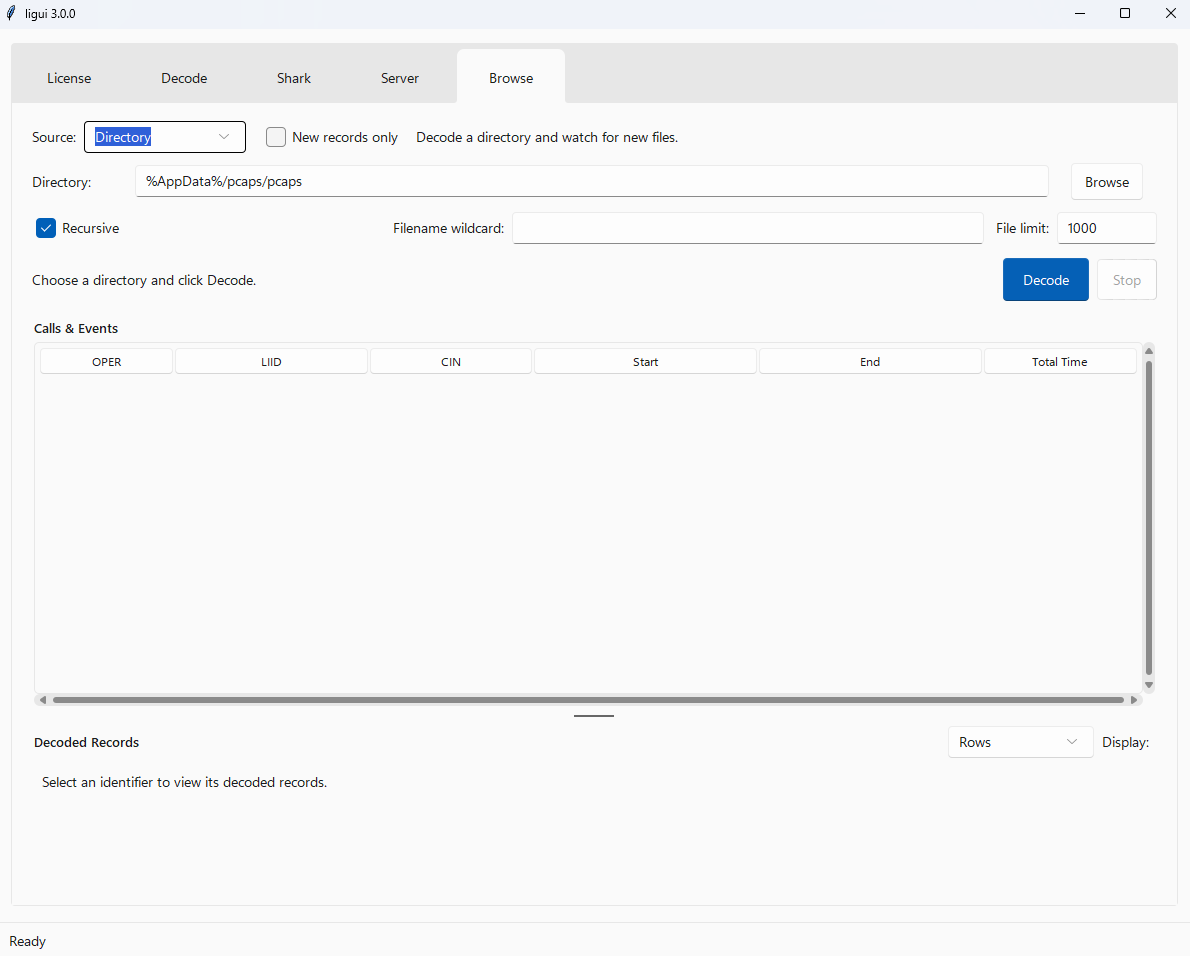
The decoding and server options are taken from the Decode and Server tabs, respectively. Refer to the relevant sections of this guide for details of the available options.
Click “Decode” to decode the files currently in the directory and start live decoding.
If the “New Records Only” checkbox is selected, existing records will be ignored, and only new files will be decoded as they arrive.
The “Recursive” checkbox is enabled by default, meaning that nested directories will also be searched for records.
A filename wildcard can also be specified to decode only matching files.